The key different between the versions are outlined below: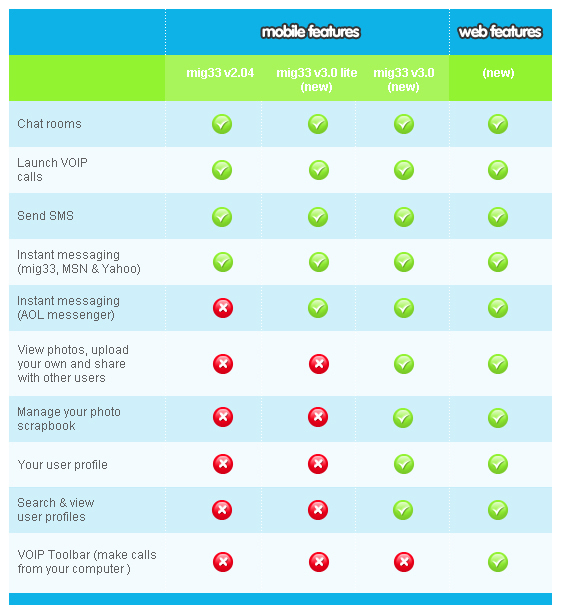
Mig33 version 3.02 (beta)
Mig33 version 3.02 is currently in beta and runs on the majority of newer phone handsets. Most phones with Java MIDP2.0 can run this version. Check your mobile phone's Java type by visiting the manufacturer's web site.
Mig33 version 3.02 lite
Mig33 version 3.02 lite is a scaled-down version. Most phones with Java MIDP1.0 (an earlier version) can run this version. Again, you can check your mobile phone's Java type by visiting the manufacturer's web site.
Read full topics only at: mig33 forum community
 i have learnd this by my own!
  you can modify mig33 files on pc! if you want you can put ur name to the back ground of ur mig33 app. ! but this not going to work on all the typs of mig33 files,
  to modify you need to have WIN RAR installed on your pc! win RAR is used to unpack applications and diferent kinds of files!
  to modify;
 open the mig33 file (open with win RAR archiver) and you will see all the types of files inside the mig33 file! now you will see a file named k.png , open that file! now you will see the image inserted to the mig33 background now right click the image and click edit now it will open paint now edit that image as you want! if you want u can write your name or mig33 id on it. eg; wicked-hot but dont increase the size of the image! if u have increasd it may not open the app. wen you hav finished editin just try to close paint. then a window wil be prompted to save changes! just click yes! now the other window will be prompted to update the it with archive! just click yes! now ur new mig33 app. is ready to be launched! open ur new mig33 file and login! now you will see the edited image on the back ground! like this you can even change the emotions and migbot's....etc
 just try it! maybe this is not new for many users! mabe this is gonna be an exiting thing for some users
THANK YOU!
Originally posted by wicked-hot in mig33 forum community